Making Connected Products Work Together
Connected products have become part of everyday life. People expect a television, soundbar, set-top box, and streaming player to work together, ideally without a complicated setup. When they do not, the boundaries between products quickly become the user’s problem.
In my professional work, I have helped build solutions for consumer-electronics manufacturers that make these setups easier to discover, control, and support.
The Starting Point
One of those solutions used software embedded in the television to discover compatible devices, such as a set-top box or streaming player, so one remote could control the setup.
That can sound like a small convenience, but the remote is the main way someone experiences the television. When one remote controls the wider setup, the television stays at the centre of it. When control breaks, the whole experience feels broken.
When the Setup Stops Working
A remote-control problem can involve the television, an external device, a network connection, or a setting that changed somewhere along the way. The person holding the remote does not care which product caused it. They just know something stopped working.
People often do not know how to describe that setup. Some are also understandably hesitant to restart devices, change settings, or disconnect cables in case they make things worse. Traditional support can spend much of the conversation reconstructing the situation before it can help.
What We Built
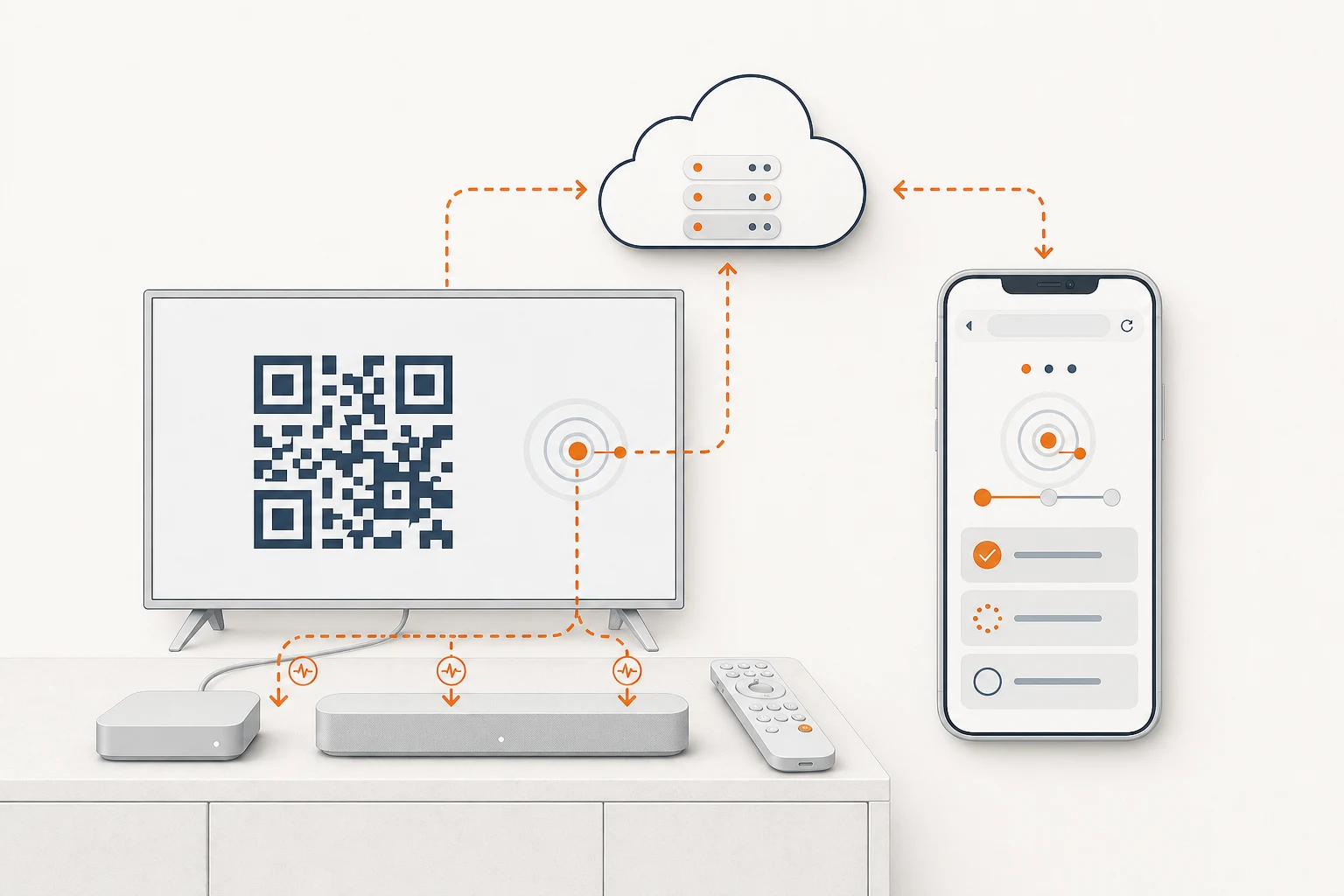
When someone needed help, the television handed the session over to a fully customer-branded support journey on their second screen, with nothing to install. The service carried over limited, temporary context from the television so it could skip irrelevant questions and start closer to the actual problem.
The journey was structured around a small number of known, high-volume issues:
- Start with the setup and issue already associated with the session.
- Ask a few clear questions, one choice at a time.
- Guide the user through relevant checks or recovery steps.
- Request a photo of a device or remote when visual evidence would help.
- Where a connected device supported it, check whether it was online and send a safe test command.
- If the issue remained unresolved, offer human follow-up with useful session context carried forward.
Why It Was Guided
This was not a free-text chatbot. We did not want people sitting in front of a television trying to find the right technical words for their problem.
The experience felt conversational, but the diagnostic paths remained controlled and testable. Each answer led to a relevant next step, and the journey could check whether an action had actually changed the situation.
My Role
My work covered the product and operating model around the support journey.
- Prioritised repeatable support topics where guided help could make a real difference.
- Turned technical diagnosis into steps that made sense to ordinary users.
- Defined the useful boundary for temporary product context during a session.
- Aligned embedded software, cloud, web, support, and operations around one journey.
- Designed recovery and escalation paths, including automatic service-ticket creation and human follow-up.
- Used session outcomes, drop-off points, and feedback from multiple markets to guide later releases.
What Changed
For the targeted universal-remote issue, the solution cut the number of cases reaching a live support agent by roughly half during the measured rollout.
Post-session ratings for usability, journey length, and the overall experience consistently landed in the top two points of a five-point scale.
These are rounded results for one defined support topic, not the manufacturer’s entire support operation.
What It Showed
The valuable part was not the chat surface. It was connecting product context, diagnosis, recovery, and human support into one path.
When a support service knows just enough about the situation, it can ask fewer irrelevant questions and verify more of what happened. That makes the experience easier for the user and gives the support team a better starting point when a person still needs help.
Back to all work